
Reduce password chaos
Count the passwords one ordinary employee is carrying. The domain password. The ERP. The travel system. The two SaaS tools their department bought. The one the finance team insists on. Somewhere between eight and twenty, each with its own rules about length and symbols, its own expiry date, and its own idea of what a username is.
People handle that the only way anyone can: they reuse, they write them down, they add a number at the end each quarter. Not because they’re careless — because nobody can do anything else with twenty of them.
It costs on both sides:
| For the person | For you |
|---|---|
| Twenty passwords, all different, all expiring on different days | An account opened in every application at onboarding, by hand |
| A reset request every time one of them lapses | An account to find and close in every one of them when they leave |
| No realistic way to use a strong password in each | A different administrator deciding who’s an admin in each tool |
| The same password, quietly, in several places | No single answer to what can this person open? |
Single sign-on replaces all of it with one identity, verified once, properly — and that’s what makes strong authentication possible in the first place. You can’t ask someone to use a hardware key on twenty separate logins. You can ask it once.
How it works
The application stops deciding who anyone is
Mirket becomes the identity provider. The application becomes a service provider: it keeps its own records — a local user object, roles, a session — but it stops being the thing that checks whether the password was right.
- The user arrives — from the Mirket portal, or at the application directly and redirected back. Both directions work, which matters because some applications only offer one.
- Mirket authenticates them — with a password and a second factor, or with a passwordless method such as FIDO2 or WebAuthn.
- Mirket issues a signed assertion — this is the person, here are their attributes, here are the groups they belong to.
- The application verifies the signature and lets them in, with the role their group membership earned them.
Because the attributes and the group membership are delivered on every sign-in, a change made in the directory is carried into the next assertion — rather than waiting for somebody to go and update the application by hand.
Federation and authentication
SAML 2.0 · OpenID Connect (OIDC)
Authorisation
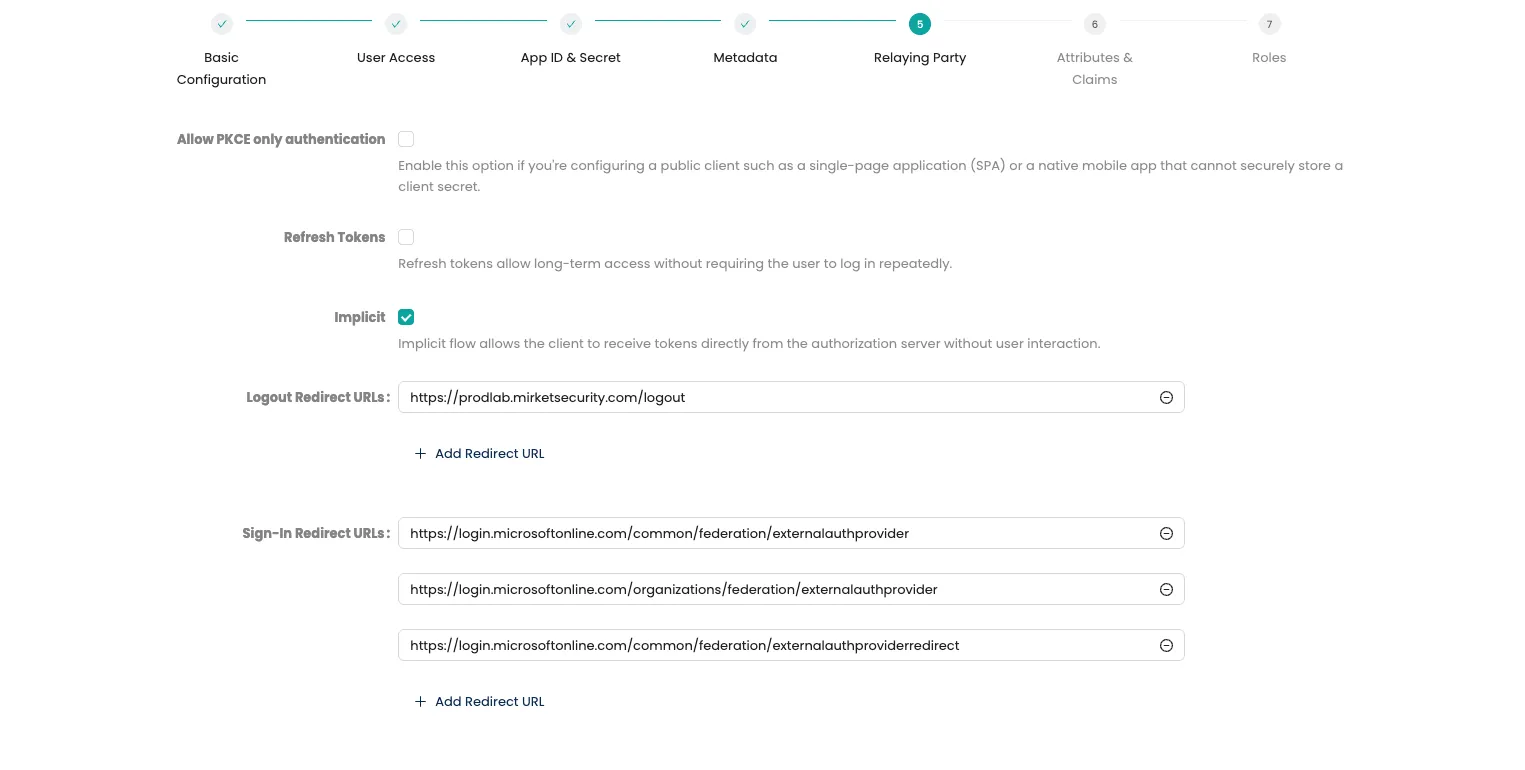
OAuth 2.0 — the framework OIDC builds on, for applications and APIs that need delegated authorisation.
One screen for applications and for servers
This is the part that usually surprises people, and it works because the modules share one platform rather than being an identity system and a PAM system somebody integrated afterwards.
Worth being precise about which module does what. Single sign-on federates the applications. Reaching a Windows server over RDP, a Linux server over SSH or a published desktop application is Mirket PAM — its authorisation, its credential injection, its recording. What single sign-on contributes is the portal they appear in, so a person sees one list instead of opening two tools.
A user signs in once and that portal shows everything they’re entitled to open.
An administrator doesn’t go to one portal for their applications and a different tool for their servers — though the entitlement behind each entry still comes from the module that provides it. It’s one list, and it only contains what they’re actually allowed to reach.
For the people running it, that single list is also the access review. What can this person open? stops being an exercise in collecting answers from eight system owners.
See your own applications and servers in one portal
A technical demo that federates an application you actually run and puts the servers your administrators reach over RDP and SSH in the same list.

Stronger authentication, because the identity provider is also the MFA
Federating to Mirket puts a single sign-in in front of everything — and then lets you make that sign-in much harder to defeat than twenty scattered ones ever were.
| Passwordless sign-in | With SSO in place, people can authenticate with a supported passwordless method — FIDO2 or WebAuthn in the browser, or an approval on the registered phone — instead of entering a password. One sign-in, and the applications open; nothing typed to phish, reuse or reset |
| Phishing-resistant methods | FIDO2 and WebAuthn — Windows Hello, Touch ID, a passkey or a hardware key — protecting a single sign-in instead of being impossible to roll out across twenty |
| Push with number matching | The number on screen has to be typed into the phone, so an approval can’t be given by reflex |
| Per-application policy | The finance system can require a stronger method than the intranet. Same identity, different bar |
| Adaptive challenges | Source IP, device, schedule and group all feed the decision about how hard to ask |
None of this needs a second vendor in front of the identity provider. The methods and the identity provider are the same platform, so a policy is one rule rather than a rule plus an integration.
Detection
One place where every application sign-in can be seen
Before federation, a sign-in is a line in one application’s own log, if it keeps one. Nobody correlates thirty of those.
Afterwards, every sign-in to every federated application passes through the same point. Two things come out of that immediately.
A real answer about licences. Seats are bought per user and renewed per invoice. The sign-in record is the first honest answer to which of those seats anybody actually opens.
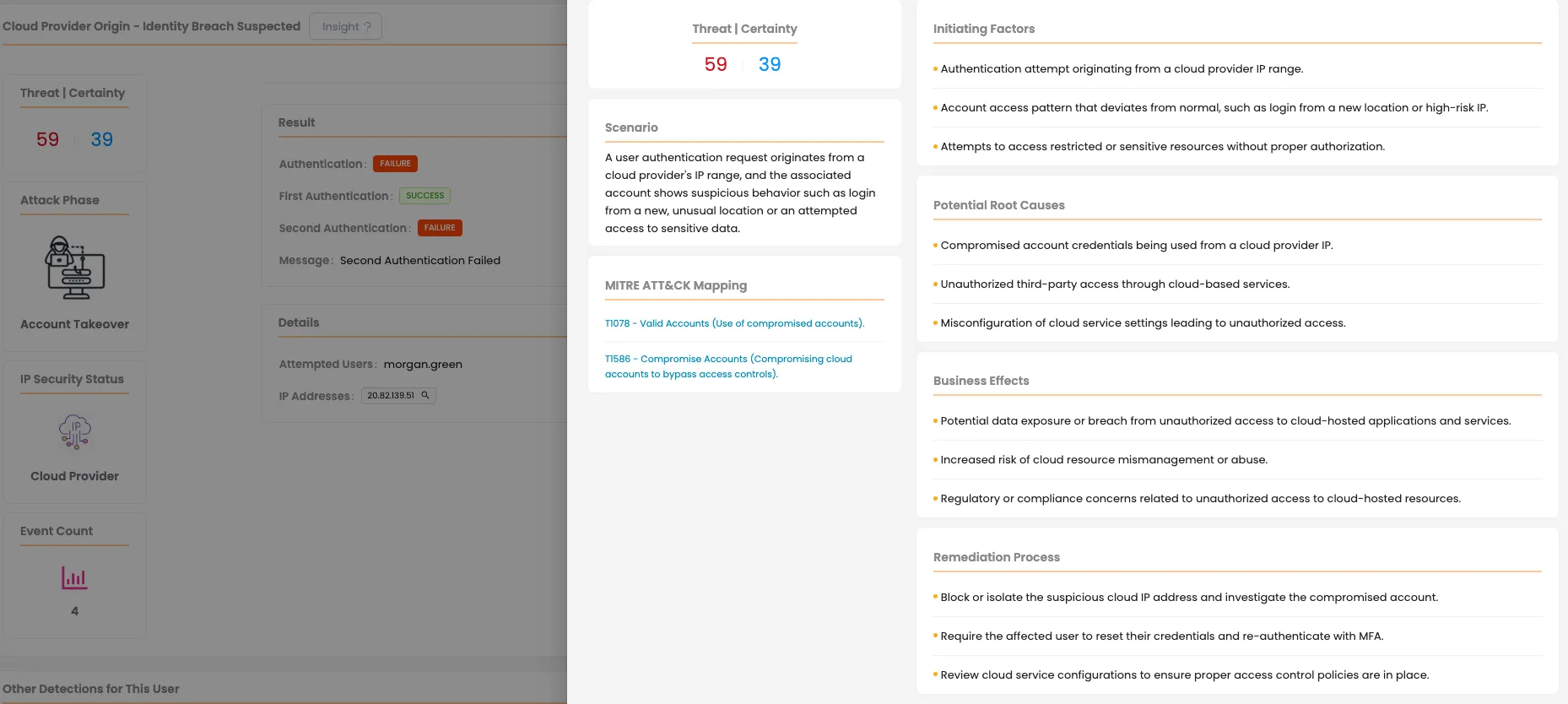
Much stronger alarms. Mirket ITDR reads these same sign-ins and scores them — behaviour, origin, pattern — and federation makes that far more powerful than it can be on a single application. One identity signing into fifteen applications produces a shape. A stolen session shows up as a shape that doesn’t fit, even though every individual sign-in succeeded.
Capabilities
| SAML 2.0 identity provider | Mirket acts as the IdP for any application that speaks SAML 2.0 |
| OpenID Connect identity provider | Applications expecting an OIDC identity token federate to the same identity, in both IdP- and SP-initiated flows |
| OAuth 2.0 authorisation | The authorisation framework OIDC builds on, for applications and APIs that need delegated authorisation rather than a sign-in assertion |
| IdP-initiated and SP-initiated | The user can start at the portal or at the application |
| Single logout | Signing out propagates to federated applications instead of leaving sessions open behind the user |
| Signed SAML response | The assertion is signed, so the service provider can verify Mirket issued it and nothing was altered in transit |
| Metadata and certificate export | Metadata XML and the signing certificate, exported for import at the service provider in .crt or .pem |
| Attribute mapping | Directory attributes mapped to the claim names each application expects — user.email, user.principalName, user.givenname and the rest |
| Custom directory attributes | Non-standard attributes from your directory can be carried into the assertion |
| Role and group assignment | Group membership travels in the assertion, so authorisation inside the application follows the directory |
| Per-application policy and RBAC | Each application carries its own policy and its own assigned users and groups |
| Per-application branding | Each portal entry carries its own name and logo |

Directories: Active Directory · OpenLDAP · Entra ID · Google Workspace · third-party identity providers. More than one at a time, and the same username in two domains is resolved without anyone typing a prefix.
- Array Networks
- Barracuda
- Check Point
- Cisco
- Citrix
- CyberArk
- Delinea
- SonicWall
- Fortinet
- F5
- Ivanti
- Microsoft
- Palo Alto Networks
- Proofpoint
- Sophos
- Canonical
- VMware
- WatchGuard
- XLOG
Audit and compliance
No product confers compliance. What one can do is give an assessor something concrete to look at. These are the clauses federation tends to land under.
ISO/IEC 27001:2022
A.5.16, A.5.18Identity lifecycle and access rights: provisioning, review and removal. Federation makes each of those one action instead of one per application
PCI DSS v4.x
Req. 8.2Every user identified individually, shared accounts eliminated. Applications reached through federation carry an identity rather than a local login
NIS2
Art. 21Access control and authentication applied consistently across systems rather than per tool
GDPR
Art. 32Access to personal data controlled and attributable — and on-premise, the identity data supporting it never leaves your environment
Deployment
On-premise, or as a service. The module is identical in each.
On-premise matters more here than it does for most products. Running your own identity provider used to be ordinary and has quietly stopped being an option: the large platforms are cloud-first, and the on-premise alternatives are either legacy or projects you maintain yourself. Mirket runs SSO inside your own data centre, supported — so the directory, the assertions and the authentication data stay on infrastructure you control.
As a service is the same product run by us, with directory integration through an agent inside your network.
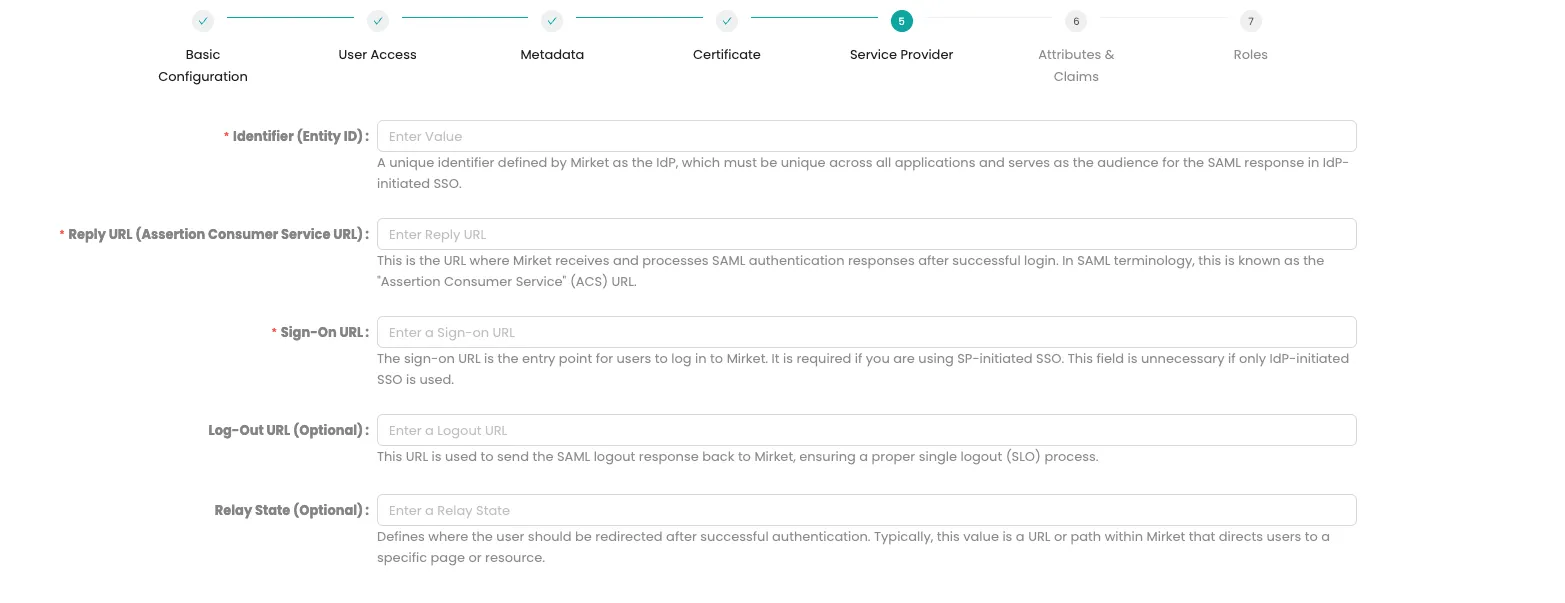
On the application side there’s nothing to install. Federation is an exchange of configuration: Mirket gives you the Entity ID, the sign-on and logout URLs and the certificate; the application gives you its identifier, its reply URL and the attribute names it expects.
Counted by defined users, no matter how many applications you federate. Adding the thirtieth application doesn’t change the number.